
How To Convert YouTube Videos Into Blog Posts: The Ultimate SEO & AEO Guide
Video content is dominating the internet, but many creators are missing a huge opportunity by not repurposing their YouTube videos into blog posts.
A single YouTube video can become a high-ranking SEO article, helping you generate additional traffic from Google Search, AI Overviews, ChatGPT Search, Gemini, Perplexity, and other answer engines.
Whether you’re a content creator, digital marketer, business owner, coach, or agency, converting YouTube videos into blog posts is one of the smartest content marketing strategies in 2026.
In this guide, you’ll learn exactly how to turn YouTube videos into SEO and AEO-friendly blog posts that drive traffic, leads, and authority.
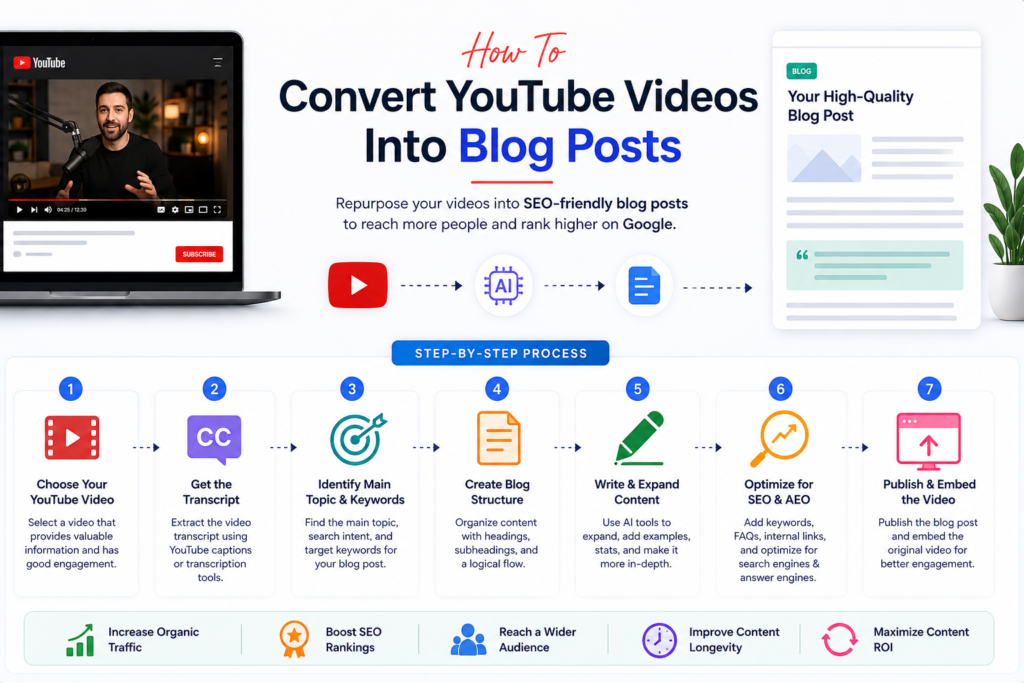
Why Convert YouTube Videos Into Blog Posts?
Most creators publish a video once and move on.
However, every YouTube video contains valuable information that can be transformed into a blog post.
Benefits include:
Increased Organic Traffic
Your blog can rank for keywords that your video may never rank for.
Better Search Visibility
You appear in:
- Google Search
- Google AI Overviews
- Bing
- ChatGPT Search
- Gemini
- Perplexity
More Leads and Conversions
Visitors who discover your blog can become subscribers, customers, or clients.
Higher Content ROI
One piece of content creates multiple assets:
- Video
- Blog Post
- Social Media Content
- Email Newsletter
- LinkedIn Article
Step 1: Get the YouTube Video Transcript
The first step is extracting the video’s transcript.
Most YouTube videos already include auto-generated captions.
You can use:
- YouTube Transcript
- Google Docs Voice Typing
- AI Transcription Tools
- Speech-to-Text Software
The transcript becomes the foundation of your blog article.
Pro Tip:
Always review and correct transcript errors before creating content.
Step 2: Identify the Main Search Intent
Before writing, determine what users actually want.
There are four primary search intents:
Informational
Example:
“What is SEO?”
Navigational
Example:
“Best SEO tools”
Commercial
Example:
“Best AI writing tools”
Transactional
Example:
“Buy SEO software”
Your blog must satisfy the same intent as the original video.
Step 3: Create an SEO-Friendly Blog Structure
Instead of copying the transcript word-for-word, organize it into a proper article format.
Example Structure:
H1
Main Topic
H2
Introduction
H2
Benefits
H2
Step-by-Step Process
H2
Tools Required
H2
Common Mistakes
H2
FAQs
H2
Conclusion
This structure improves readability and SEO performance.
Step 4: Expand the Content
Most video transcripts are conversational.
Blog posts require more depth.
Expand by adding:
Examples
Real-world applications.
Statistics
Industry data and trends.
Expert Insights
Additional explanations.
Case Studies
Practical demonstrations.
FAQs
Answer common user questions.
Google and AI search engines prefer comprehensive content.
Step 5: Optimize for SEO
SEO optimization helps search engines understand your content.
Keyword Placement
Include keywords in:
- Title
- URL
- Meta Description
- H1 Heading
- H2 Headings
- First 100 Words
- Image Alt Text
Internal Linking
Link to related articles on your website.
Example:
- SEO Guide
- Content Marketing Guide
- Keyword Research Guide
External Linking
Reference authoritative resources when relevant.
Step 6: Optimize for AEO (Answer Engine Optimization)
AEO focuses on helping AI systems understand and cite your content.
Answer engines prefer:
Direct Answers
Answer questions immediately.
Bad Example:
SEO is something many people use.
Good Example:
SEO (Search Engine Optimization) is the process of improving a website’s visibility in search engine results.
FAQ Sections
Add common questions.
Structured Headings
Use H2 and H3 tags consistently.
Short Paragraphs
Improve readability for humans and AI systems.
Step 7: Add Visual Content
Blogs with visuals perform significantly better.
Include:
Screenshots
Show processes.
Infographics
Explain concepts visually.
Flowcharts
Demonstrate workflows.
Featured Images
Increase click-through rates.
Visual content improves engagement and dwell time.
Step 8: Embed the Original YouTube Video
Always embed the original video inside the blog.
Benefits:
- Increased watch time
- Better user experience
- Higher engagement
- Improved session duration
Visitors can choose between reading and watching.
Best AI Tools for Converting YouTube Videos Into Blog Posts
ChatGPT
Best for:
- Long-form blog writing
- Content expansion
- SEO optimization
Claude
Best for:
- Transcript analysis
- Content summarization
Gemini
Best for:
- Research enhancement
- Content ideation
Jasper AI
Best for:
- Marketing content
- Blog automation
Writesonic
Best for:
- SEO-focused articles
Surfer SEO
Best for:
- Content optimization
- Keyword recommendations
Common Mistakes to Avoid
Publishing Raw Transcripts
Transcripts are difficult to read and rarely rank well.
Ignoring Search Intent
Content must match what users are searching for.
Keyword Stuffing
Use keywords naturally.
No Internal Links
Internal links improve SEO authority.
Weak Headlines
Your title should encourage clicks.
SEO Checklist for YouTube-to-Blog Conversion
✓ Target Primary Keyword
✓ Add Meta Title
✓ Write Meta Description
✓ Use H1 Heading
✓ Include H2 and H3 Headings
✓ Optimize Images
✓ Add Internal Links
✓ Add FAQ Section
✓ Embed Video
✓ Include Call-to-Action
Frequently Asked Questions
Can I turn a YouTube video into a blog post?
Yes. You can use the video transcript and expand it into a structured article optimized for SEO and AEO.
What is the best AI tool for converting YouTube videos into blogs?
ChatGPT, Claude, Gemini, Jasper AI, and Writesonic are among the most effective tools.
Does Google rank blog posts created from YouTube videos?
Yes. If the content is original, helpful, and optimized properly, it can rank very well.
How long should a YouTube-based blog post be?
Typically between 1,000 and 2,500 words depending on topic complexity and competition.
Is content repurposing good for SEO?
Absolutely. Repurposing content increases visibility, topical authority, and organic traffic.
Conclusion
Converting YouTube videos into blog posts is one of the most effective content repurposing strategies available today. It allows creators and businesses to maximize the value of every video while improving visibility across Google Search, AI Overviews, ChatGPT Search, Gemini, and other answer engines.
By combining SEO best practices with AEO optimization, you can transform a single YouTube video into a powerful traffic-generating asset that continues to attract visitors long after the video is published.
Start with your existing YouTube content, create structured blog posts, optimize them for search intent, and build a content ecosystem that drives consistent organic growth.